Volleyball Code
Coach Handbook
Everything the app does, from the first roster to the last export — including the full barème a coach speaks into the microphone.
This handbook is the complete reference for Volleyball Code. Read it end to end once and you will know every word the app listens for, every symbol it stores, and every number it hands back. If you only have five minutes before a match, read 3.3 The barème — that one table is the app.
Use the ⤓ Download PDF button at the top of the page (or your browser's Print → Save as PDF). The handbook is laid out for A4 with chapters starting on fresh pages, so the printed copy reads like a manual rather than a web page.
1. Before you start
1.1 What Volleyball Code is
Volleyball Code turns what a coach already says out loud into a coded match. You speak the rally — "Team A number 9 serve continue, Team B number 2 reception perfect, Team B number 14 attack point" — and the app transcribes it, corrects the transcript, splits it into individual actions, shows you what it understood, and only then commits it. Committing updates the score, rotates the correct team, and files every touch against the right player.
The result, at the end of a match, is the same data a statistician with a laptop would have produced: a full play-by-play, per-player skill lines, side-out and break-point percentages by rotation, and an attack map. The difference is that you got it while coaching, with your eyes on the court.
1.2 What you need
| Item | Requirement |
|---|---|
| Device | Any phone, tablet or laptop. A phone in a pocket with a wired or Bluetooth headset is the most common bench setup. |
| Browser | A current Chrome, Edge, Safari or Firefox. Android users can also install the app from the Play Store. |
| Microphone | Any. A headset microphone close to your mouth beats a good phone microphone across a loud gym every time. |
| Connection | Voice coding needs the internet — speech is transcribed on a server. Your match data is saved to the device first, so a dropped connection never loses a rally. |
| Account | A free account. Matches are stored on the device and synced to your account so they survive a lost phone. |
1.3 Creating an account
Open volleyballcode.com and sign up with an email address or with Google. There is no credit card at any point in the free plan. Once you are in, you land on the Dashboard, which is where every match begins and ends.
1.4 Plans and limits
The free plan is a real plan, not a demo — it codes a full match by voice with live scoring, rotations and team statistics.
| Free | Pro | Club | |
|---|---|---|---|
| Matches per month | 1 | Unlimited | Unlimited |
| Voice coding | 75 min / month | 5 h / month (≈ 4 matches) | Unlimited |
| Live score & rotation | Yes | Yes | Yes |
| Team KPI cards | Yes | Yes | Yes |
| Per-player & rotation tables | — | Yes | Yes |
| Attack zones | — | Yes | Yes |
| Season analytics | — | Yes | Yes |
| CSV & PDF export | — | Yes | Yes |
| Cloud sync | Yes | Yes | Yes |
Voice minutes count recording time only: the microphone sitting idle between rallies costs nothing. Cloud sync is on every plan on purpose — it is how the app saves anything at all, not a feature to withhold. Current prices are on the pricing page.
2. Setting up a match
Setup is three screens: teams, rosters, starting rotations. Done once for a team, it is reusable for the whole season.
2.1 The dashboard
The dashboard lists your matches, newest first, and holds the New Match button. If you left a match unfinished, a resume banner appears at the top — see 4.6. A match card shows the two team names, the set scores and the date; tapping it opens that match's statistics.
2.2 Team names
Name both sides. Team A is always your team (the "home" side in every table and export) and Team B is the opponent. You can speak either the letter or the name during the match — "Team A", or "Eagles" if that is what you called them — but the letters are what the microphone hears most reliably in a loud gym.
2.3 Rosters
Add each player with a shirt number, a name and a role. Two rules are enforced before a match can start:
- At least 6 players per team. Fewer than six cannot fill a rotation.
- No duplicate numbers within a team. Two number 9s make every action ambiguous. The two teams may of course both have a number 9.
| Role | Meaning | Why the app cares |
|---|---|---|
| OH | Outside hitter | Attacks are credited to zone 4 after the post-serve switch |
| OPP | Opposite | Attacks are credited to zone 2 (zone 4 when the setter is in P1) |
| MB | Middle blocker | Stays in zone 3 in every rotation |
| S | Setter | Drives the setter-position badge and the rotation numbering |
| L | Libero | Tracked in reception and dig, never in attack zones |
| DS | Defensive specialist | Falls back to the literal court slot |
Roles are optional, but without them the attack map can only report the literal P1–P6 slot a player stood in, which reads as nonsense to a coach: an outside hitter rotationally in P2 still runs left and hits zone 4.
Faster entry. The 📋 Paste / edit as text button swaps the player list for a text box, one player per line, in the form 9 - Player Name - OH. Paste a roster out of a spreadsheet or a team chat and it is done in one action. 💾 Save to My Teams keeps the roster for the next match so you never type it twice.
2.4 The starting rotation
The last setup screen asks where each player starts, P1 through P6. P1 is the serving position (back right) and the numbering runs against the direction of rotation: P1 → P6 → P5 → P4 → P3 → P2.
Set this correctly and you never think about rotation again: the app rotates the receiving team automatically on every side-out, for both teams, for the rest of the match.
2.5 Starting
Choose which team serves first, then start. The app validates both rosters, assigns the match an ID, and opens the coding screen. From this moment the match is live and every action is saved as you go.
3. The Volleyball Code code
This is the chapter that matters. Everything else in the app is a consequence of what you say here.
3.1 One action, four slots
Every action is a short sentence with four slots, always in the same order:
Shorter forms all parse — Team A 9 attack point, A 9 attack point, or your own team name in place of the letter. The full form is simply the one the microphone hears most reliably. The order never changes: team, number, skill, result.
3.2 The seven skills
A skill is the type of contact. There are seven, and each accepts several natural words so you can speak the way you already speak on the bench.
| Skill | Letter | Say any of |
|---|---|---|
| Serve | S | serve · serving · service |
| Reception | R | reception · receive · pass |
| Set | E | set |
| Attack | A | attack · spike · hit |
| Block | B | block |
| Dig | D | dig · defense · defence |
| Free ball | F | free ball · freeball · free |
Three of these are terminal skills — serve, attack and block. They are the only ones that can win a rally outright, which is what 3.3 is about. Reception, set, dig and free ball keep the ball alive; they can lose a rally through an error, but they can never win one.
Two extra words are accepted with no skill at all: net and touch. "Team A 9 net touch" is recorded as an error and gives the point away, which is exactly what it does on the court.
3.3 The barème
The result is how that contact ended. Volleyball Code uses the FIVB / Data Volley scale — the barème — which has five rungs and one symbol per rung. The symbol is the only thing the scoring engine reads. Whatever word you spoke, in whichever language, it resolves to one of these five characters and nothing else travels any further.
| Symbol | Rung | Say | What it does |
|---|---|---|---|
# | Perfect / point won | point · perfect | On serve, attack or block: point for that team. On reception, set, dig or free ball: a great ball, rally continues. |
+ | Positive | positive | Good contact, team in control. Rally continues, no point. |
! | In play | continue | Ordinary contact, ball stayed up. Rally continues, no point. |
- | Poor | poor | Bad contact but still alive. Rally continues, no point. |
= | Error | error | Point for the other team, whatever the skill was. |
Five words cover a whole match: point, positive, continue, poor, error. A coach holding five words calls a rally faster than one choosing between twenty — which is why the app teaches these and quietly accepts the rest (see 6.1).
"Perfect" and "point" are the same call. They are one rung (#) spoken two ways. What changes between them is the skill, not the outcome: on a serve, an attack or a block, # wins the rally; on a reception, a set or a dig, # means a great ball and play goes on. You never have to decide which word is "allowed" — say whichever comes out, the app resolves it from the skill.
3.4 The barème, skill by skill
The same five symbols read differently depending on what was hit. This is the table to keep on the bench.
# | + | ! | - | = | |
|---|---|---|---|---|---|
| Serve | Ace — point | Tough serve, opponent struggling | Serve in, rally on | Easy serve, free pass for them | Serve error — point against |
| Reception | Perfect pass, all options open | Good pass | Passed, ball is up | Poor pass, one option left | Shanked or aced — point against |
| Set | Perfect ball to the hitter | Good set | Set delivered | Poor set, hitter in trouble | Ball handling / double — point against |
| Attack | Kill — point | Hard attack, opponent scrambling | Attack in play | Roll shot returned easily | Out, net, or stuffed — point against |
| Block | Stuff block — point | Block touch, ball controlled | Block touch, rally on | Block touch, ball deflected badly | Block error / net — point against |
| Dig | Perfect dig, counter-attack on | Good dig | Ball dug up | Poor dig, free ball back | Not dug — point against |
| Free ball | Perfect free ball | Good free ball | Free ball sent over | Poor free ball | Free ball error — point against |
A stuff block is spoken from the blocker's side. Say "Team B 9 block point" — block is a skill, not a result. The app infers the attack that was stopped and files it against the attacking team as Blocked, so their attack efficiency drops as it should. Coaches coming from other systems reach for "attack blocked" out of habit; that still parses and still gives the point away correctly, but it credits no blocker.
3.5 Chaining a whole rally
You do not stop after every contact. Call the entire rally in one breath and the app splits it into separate actions — a new action starts wherever a team is named again.
Three touches recorded, the point given to Team B, Team B rotated, all before the next whistle. Words like then, after that and next also separate actions if you prefer to speak that way.
You are never obliged to code every touch. Code only what you will look at afterwards. The one action you should always call is the one that ends the rally, because that is the only one that moves the scoreboard.
3.6 What the app fills in for you
Two touches are so mechanically implied by another that the app records them itself, so your totals stay honest without you having to say more. They appear in the confirm box marked as team actions, with no player number attached.
| You say | The app also records | Why |
|---|---|---|
Serve # (ace) | Opponent reception = | An ace is by definition a failed reception |
Serve + | Opponent reception - | A tough serve that stayed up means a poor pass |
Serve - | Opponent reception + | An easy serve means a comfortable pass |
Serve ! | Opponent reception ! | Counts the reception without inflating the positivity % |
Block # (stuff) | Opponent attack = Blocked | Otherwise a stuffed attack would vanish from their attempts and their efficiency would improve every time they were blocked |
A serve = generates nothing: nobody received it. And if you spoke the reception yourself in the same rally, yours wins — the app never doubles up on a touch you called. Both inferences can be switched off in Profile if you prefer to code every touch by hand.
3.7 Typing a code instead of speaking it
Under the scoreboard there is a text field. Anything you can say, you can type — useful when the gym is too loud, when your voice is gone, or when you are correcting something after the fact. The typed form is compact and positional:
[team]-[skill letter][player number][symbol]| Typed | Means |
|---|---|
H-A9# | Team A (home), attack, number 9, kill — point to Team A |
A-R12+ | Team B (away), reception, number 12, positive |
H-S4= | Team A, serve, number 4, error — point to Team B |
TB B7# | Team B, block, number 7, stuff block — point to Team B |
A9! | Team A assumed, attack, number 9, in play |
The team prefix accepts H, HOME, TA or TEAM A for your side and A, AWAY, TB or TEAM B for the opponent, with or without the dash. Leave it off entirely and your team is assumed. Leave the symbol off and the action is recorded as ! — in play. Press Enter to commit; typed codes skip the confirm step, because you already saw what you typed, and they get the same automatic reception and attack inference as spoken ones.
4. Coding a live match
4.1 The coding screen
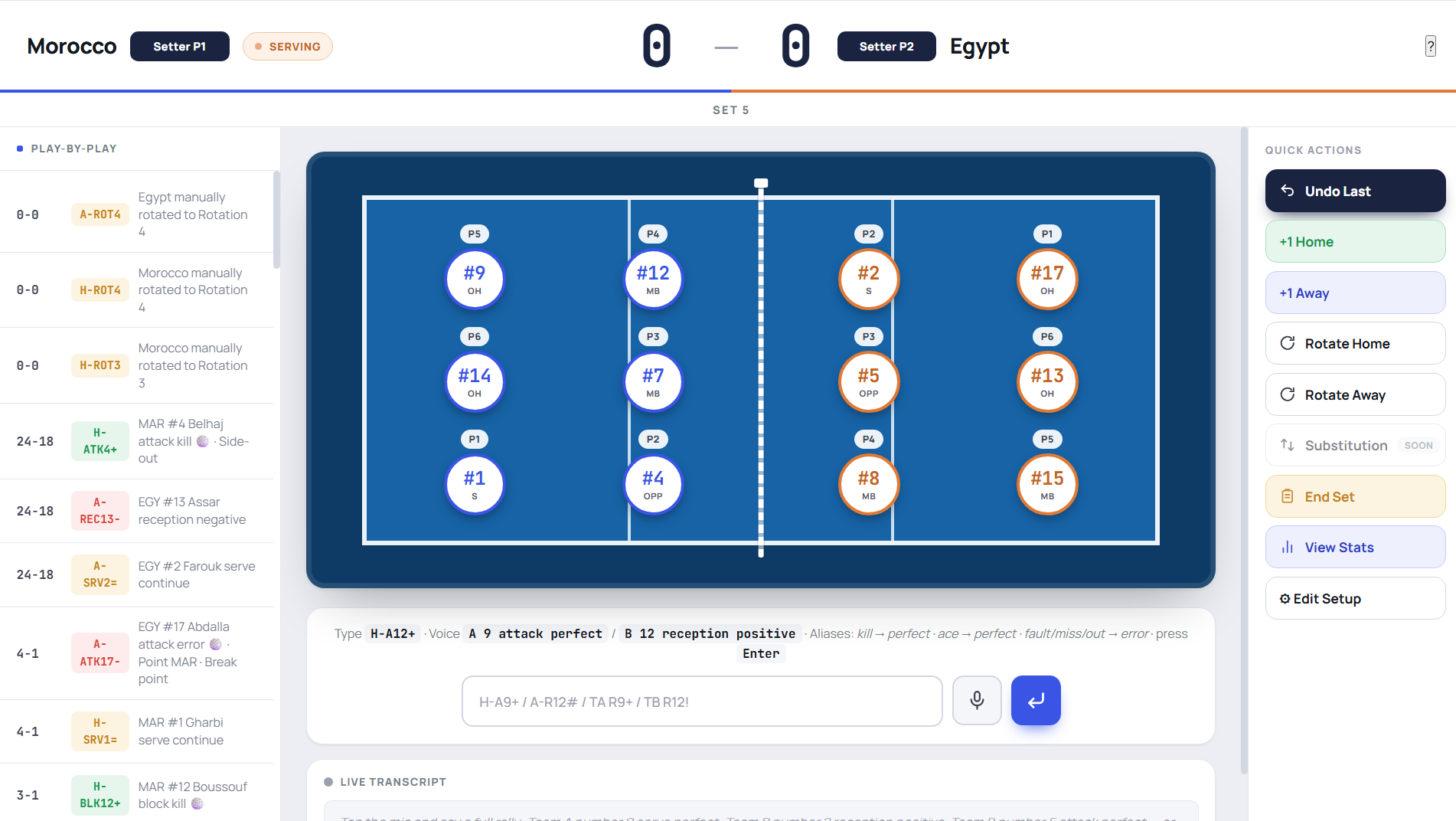
One screen holds everything you need during play: the scoreboard with the serving indicator, both courts showing who is standing where, the live transcript, the code field, and the running play-by-play. The How to speak button opens a one-screen summary of chapter 3 at any time — it reads its words out of the parser itself, so it can never advertise something the app would reject.
4.2 Record, confirm, commit
The loop is three steps and never changes:
- Record. Tap the microphone. The transcript appears live as you speak, so you can see the app is hearing you.
- Confirm. When you finish the rally, the app shows what it understood as a short list — team, number, skill, result, one row per action. Glance at it. A wrong jersey number is fixed in one tap.
- Commit. Confirm, and the score, the rotation and every statistic update together. Discard, and nothing happened.
Nothing reaches your statistics until you confirm. That step is why voice coding stays accurate in a gym loud enough that you have to shout.
The app knows a rally is over when it hears a terminal word — point, error, ace, kill, out, blocked, rally over and their relatives. If you trail off without one, it keeps listening; say "point" or "error" and it closes the rally immediately.
4.3 Scoring and rotation
The whole scoring rule fits in three lines:
#on a serve, attack or block → point to the team that made the contact.=on anything → point to the other team.- Everything else → no point, rally continues.
When a point goes to the team that was not serving, that is a side-out: the app rotates them one position and hands them the serve, exactly as the referee would. You will see a "↻ Side-out: … rotated" confirmation and both courts redraw. Because the rotation is derived from the score rather than tracked by hand, it cannot drift out of step over five sets.
4.4 Corrections
| Situation | What to do |
|---|---|
| The last action was wrong | Undo — reverses the action, the point and the rotation together |
| A point was scored off the ball (card, net touch you missed) | The +1 button on that team's scoreboard |
| The score is right but the count drifted | The −1 button |
| The court does not match reality after a substitution | The manual rotate arrow on that team |
| The app misheard a jersey number | Fix it in the confirm box before committing, or undo and type the code |
4.5 Ending a set and a match
End Set closes the set, banks the score, and resets both teams to their starting rotation for the next one. Repeat until the match is decided, then end the match. A completed match moves off the dashboard's resume banner and into your match list, where its statistics are permanent.
4.6 Resuming an unfinished match
If a phone dies, a browser is closed, or a match is interrupted, nothing is lost. The dashboard shows a resume banner for the unfinished match; open it and you are back exactly where you stopped — same score, same rotation, same play-by-play. Match data is written to the device first and synced to your account after, so neither a flat battery nor a dead gym Wi-Fi can cost you a set.
5. Reading your statistics
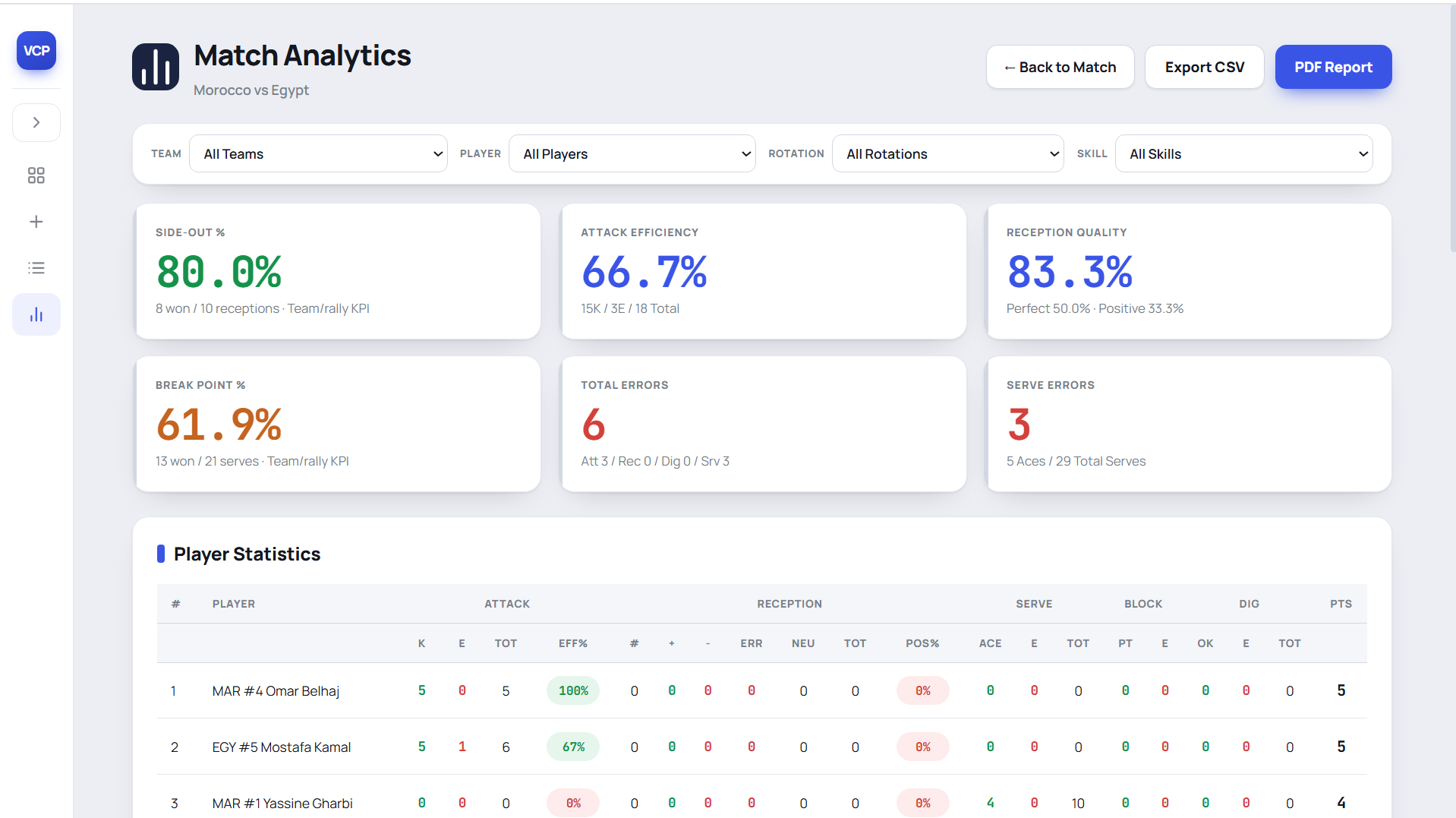
Open a match from the dashboard to see its statistics. Every number below is computed from the actions you coded — nothing is estimated.
5.1 The KPI cards
Six numbers at the top, the ones a coach argues about at half-time.
| Card | How it is calculated | What it tells you |
|---|---|---|
| Side-Out % | Rallies won when receiving ÷ rallies received | The single most predictive number in volleyball. Below 50% you lose; above 65% you are hard to beat. |
| Attack Efficiency | (kills − errors − blocked) ÷ total attacks | Attacking quality net of mistakes. Ranges from −100% to +100%; 30%+ is a strong match. |
| Reception Quality | Positive receptions (# and +) ÷ total receptions | Whether your setter had options. The breakdown under the number shows the full spread: # / + / − / error / neutral. |
| Break Point % | Rallies won when serving ÷ rallies served | Your ability to score in a row. This is what turns a close set. |
| Total Errors | All = actions, broken down by skill | Points you handed over. Compare with the opponent's total before blaming the attack. |
| Serve Errors | Serve = count, with aces alongside | The aggression trade-off, in one line. |
5.2 The player table
One row per player, with the skill blocks a coach expects:
| Block | Columns |
|---|---|
| Attack | K (kills) · E (errors) · B (blocked) · TOT · EFF% |
| Reception | # · + · − · ERR · NEU · TOT · POS% |
| Serve | ACE · E · TOT |
| Block | PT (stuff blocks) · E |
| Dig | OK · E · TOT |
| Points | Total points the player scored directly |
Both teams are listed. Because you code the opponent with the same sentence, you finish every match with a scouting line on the team you just played.
5.3 Rotation performance
The same match, broken down by the six rotations, with tabs for side-out, break point, points and skills. This is where a season's real problem usually hides: one rotation siding out at 38% while the other five sit above 60% is worth more to a coach than any individual statistic.
5.4 The attack map
Where the ball was actually hit from — outside, middle, right, pipe and bic — by share and efficiency, for your team and the opponent. The app reads the rotation at the moment of each attack and applies the post-serve switch, so an outside hitter rotationally in P2 is correctly credited to zone 4 rather than to the slot they happened to start in.
5.5 Season mode
Switch statistics from a single match to the season and everything above aggregates across every match you have coded: KPI trends match by match, player totals, rotation performance over time, and zone drift. Your team is always normalised onto the same side, so a match where you were listed second does not contaminate the totals.
5.6 Getting the data out
| Export | What you get |
|---|---|
| PDF match report | A printable report: score by set, KPI summary, full player table, rotation performance. Opens in a new window ready to print. |
| CSV | Every action as a row, for your own spreadsheet or a federation's template. |
| Share link | A read-only web link to the match report. No login for whoever opens it — send it to a club director or a parents' group and it just opens. |
6. Reference tables
6.1 Every accepted word — English
The sheet in the app teaches one word per rung. These are all the words that also work, kept accepted so a coach who learned a different vocabulary mid-season is never told their word is wrong.
| Resolves to | Say any of |
|---|---|
# Perfect / point | point · perfect · excellent · kill · ace |
+ Positive | positive · good · great |
! In play | continue · neutral · ok · okay · average |
- Poor | poor · negative · bad |
= Error | error · mistake · failed · miss · out · fault · blocked |
| Serve | serve · serving · service |
| Reception | reception · receive · pass |
| Set | set |
| Attack | attack · spike · hit |
| Block | block |
| Dig | dig · defense · defence |
| Free ball | free ball · freeball · free |
| Error (no skill) | net · touch · net touch |
| Team A | team a · A · home · your team's name |
| Team B | team b · B · away · the opponent's name |
| Action separator | then · after that · next |
6.2 Every accepted word — French
Volleyball Code codes in French as well as English. The screen language and the spoken language are separate settings — a coach can speak French to an English interface. Set the spoken language in Profile; the choice is stamped onto the match when it starts.
| Resolves to | Say any of |
|---|---|
# Parfait / point | point · parfait · ace · gagnant |
+ Positif | positif · bon |
! En jeu | continue · neutre · moyen · correct |
- Faible | faible · négatif · mauvais |
= Faute | faute · erreur · dehors · out · raté · manqué · bloqué |
| Serve | service |
| Reception | réception |
| Set | passe |
| Attack | attaque |
| Block | contre |
| Dig | défense |
| Free ball | balle facile · freeball |
| Error (no skill) | filet · touche |
| Action separator | puis · ensuite · après |
Say réception for a reception, never passe. In French volleyball la passe is the set. If passe also meant reception, every set in the match would be filed as a reception and your side-out numbers would be meaningless.
Say bloqué, not contré, if you call a stuff from the attacker's side. Speech recognition returns accents unreliably, and an unaccented contre is the block skill itself. Better still: call it from the blocker's side — "Équipe B 9 contre point".
6.3 Symbols and letters at a glance
| Symbol | Meaning | Letter | Skill |
|---|---|---|---|
# | Perfect / point won | S | Serve |
+ | Positive | R | Reception |
! | In play | E | Set |
- | Poor | A | Attack |
= | Error | B | Block |
D | Dig | ||
F | Free ball |
7. Troubleshooting
| Symptom | Cause and fix |
|---|---|
| The transcript stays empty | The browser has not been granted microphone access, or another app is holding the microphone. Check the permission prompt, close other recording apps, reload. |
| The rally never closes | The app is waiting for a terminal word. Say point or error to close it. |
| The wrong jersey number is picked up | Say "number nine" rather than just "nine" — the keyword tells the app a jersey number follows. Fix it in the confirm box before committing. |
| Team A and Team B get swapped | Single letters are the hardest thing for a microphone in a gym. Say "Team A" in full, or use your team names. |
| An action is filed against the wrong team | Each action must start with the team. Without it, the action attaches to the previous one. |
| The score is right but a rotation is wrong | Use the manual rotate arrow on that team. The score is not touched. |
| Attack efficiency looks too good | Stuff blocks against you are only counted if the block was coded. Code the opponent's blocks — see 3.6. |
| The match disappeared | It has not. Check the resume banner on the dashboard, and that you are signed into the same account. |
| Voice stops mid-match | You may have reached your monthly voice allowance. The code field keeps working — see 3.7 — and the pricing page shows your options. |
Where to go next
Short, illustrated walkthroughs of each step live in the tutorials. The statistics guide explains what the numbers mean in volleyball terms rather than app terms. Anything not covered here: contact us.
Code your next match by voice
Set the roster, press record, and speak the rally. Volleyball Code keeps the score, the rotations and the statistics. Start free, no card.
Start free →Volleyball Code Coach Handbook · Edition September 2026 · volleyballcode.com/handbook